Tag: Hotel Search

PointsYeah product

  • How to Use Daydream Explorer to Find Award Flights and Hotels

    How to Use Daydream Explorer to Find Award Flights and Hotels

    Sometimes the hardest part of planning a trip isn’t finding award availability. It’s deciding where to go.

    Daydream Explorer helps you discover destinations, award flights, and hotels when your plans are flexible. Instead of searching one route at a time, you can explore the world using an interactive map, browse award opportunities across regions, and compare both flights and hotels in one place.

    Whether you’re looking for your next vacation or simply seeing where your points can take you, here’s how to get started.

    What Is Daydream Explorer?

    Daydream Explorer helps you discover where your points can take you.

    Unlike Live Search, which starts with a specific route, Daydream Explorer lets you begin with a broader idea. Search from an airport, state, country, region, continent, or even “Anywhere,” then explore destinations that match your travel dates and preferences.

    You can switch between Flights and Hotels at any time, making it easy to discover both award flights and places to stay from a single search.
    Find Award Flights

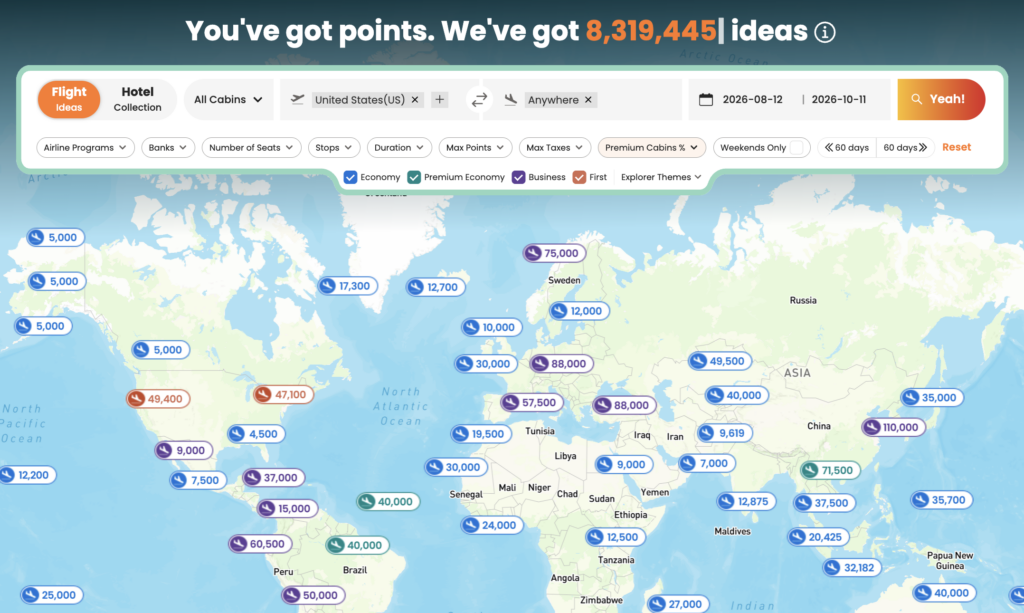
    Daydream Explorer makes it easy to discover award flights when you’re flexible about where to travel.

    Start by choosing where you’ll depart from. You can search using:

    • Anywhere
    • Continents
    • Regions
    • Countries
    • States
    • Airports

    Next, choose where you’d like to travel using the same flexible location options.
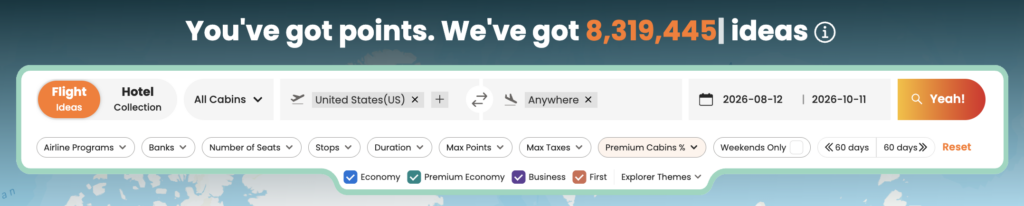
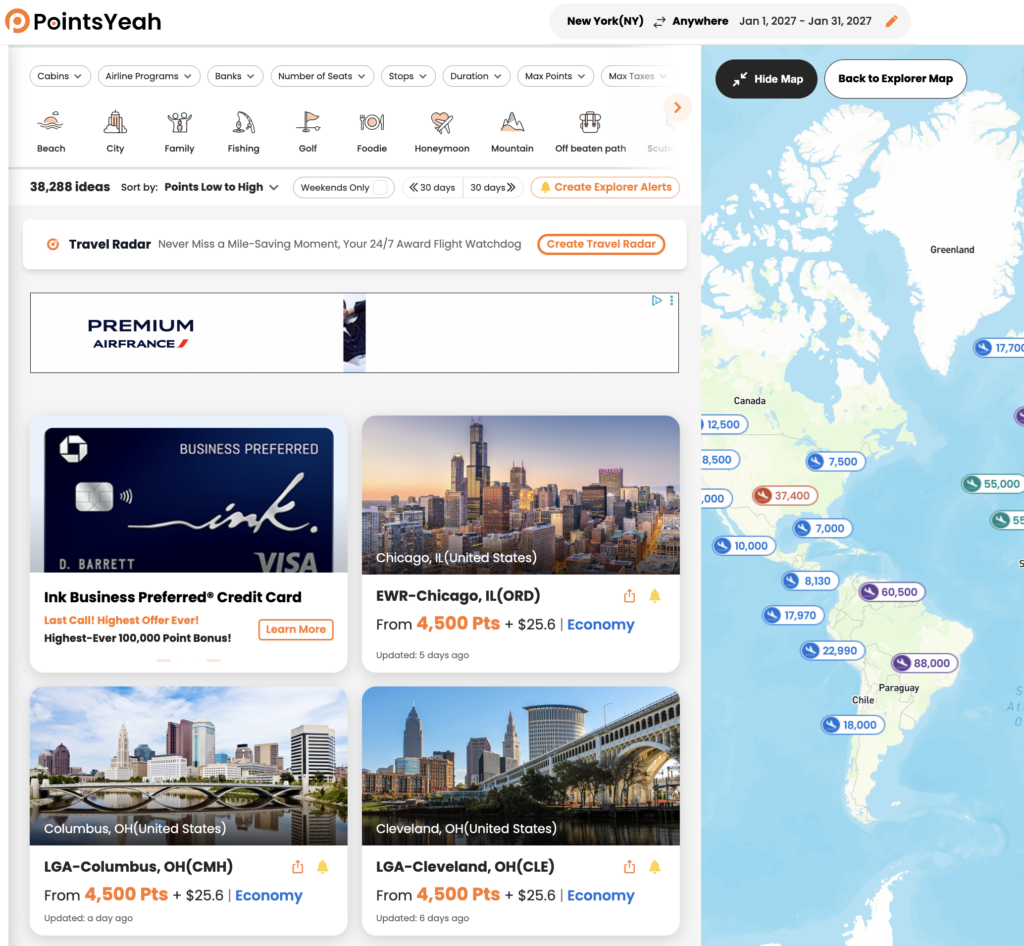
    Once you’ve entered your travel dates, Daydream Explorer displays matching destinations on both an interactive map and a list view. Select any destination to compare award pricing across supported airline loyalty programs, view available cabins, and explore different redemption options.

    When you’re ready to book, select Yeah, Let’s Go to continue your search with Live Search and view real-time availability.
    Find Award Hotels

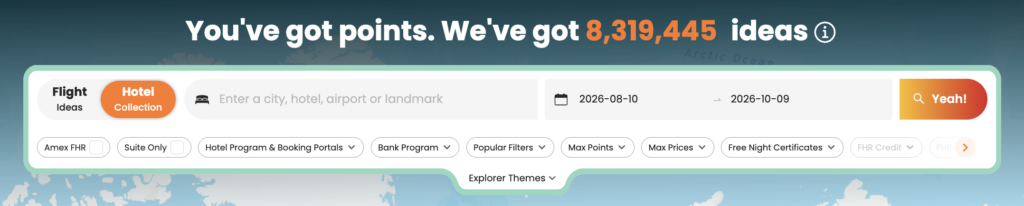
    Switch to the Hotels tab to explore hotels you can book with points.

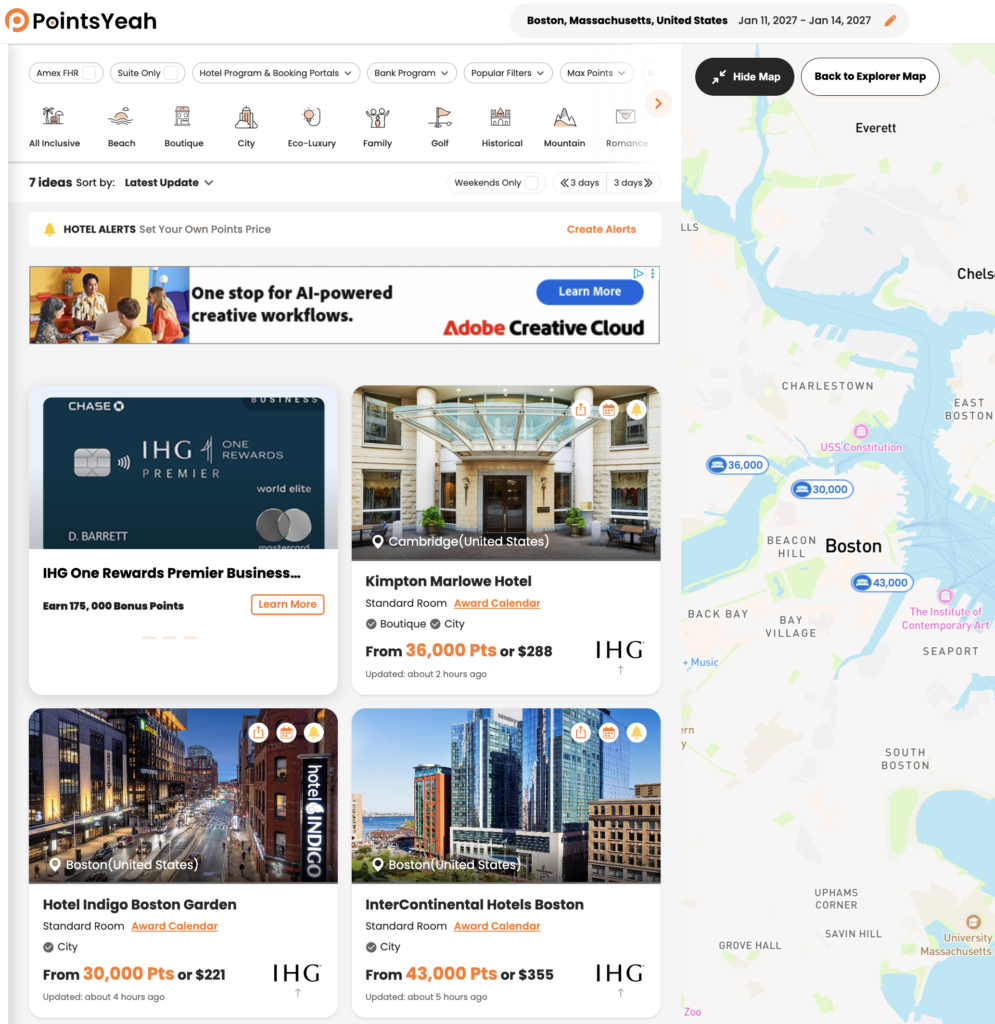
    Search by city, airport, region, country, landmark, or broader destination, then compare hotels across supported loyalty programs using either the interactive map or list view.
    Each hotel result includes information such as:

    • Award pricing
    • Cash rates
    • Hotel brand
    • Guest ratings
    • Amenities
    • Property location

    Selecting Yeah, Let’s Go takes you directly to the hotel’s booking page for the dates you’ve selected.
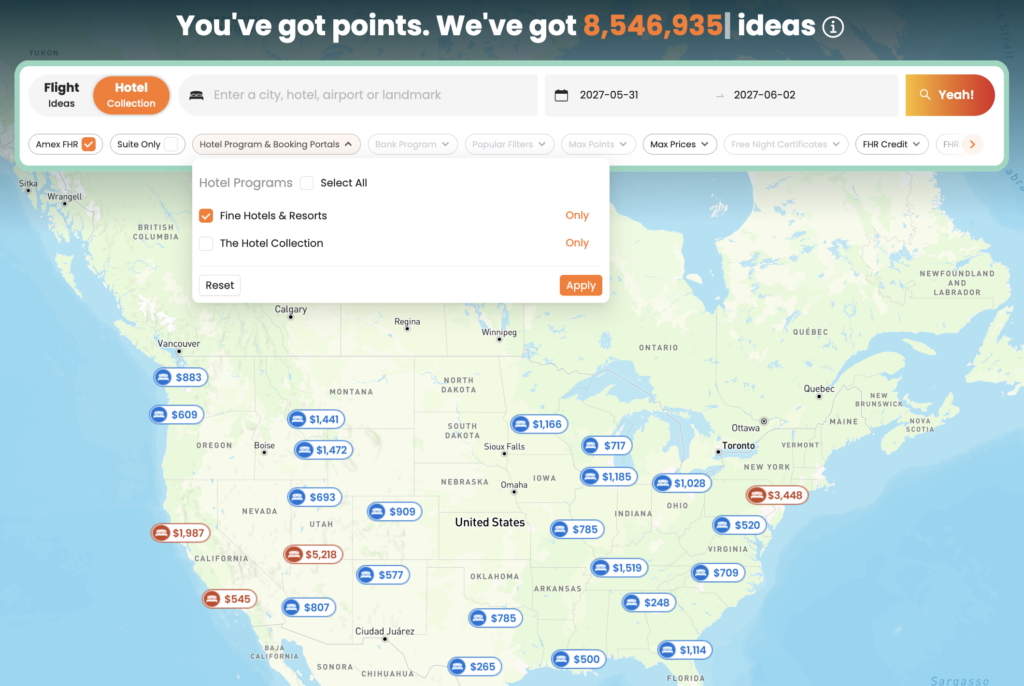
    Search American Express Fine Hotels + Resorts®

    You can also enable the American Express Fine Hotels + Resorts® filter while searching hotels to view participating Fine Hotels + Resorts® and The Hotel Collection properties.

    To learn more, see How to Search Amex Fine Hotels + Resorts with PointsYeah.

    Use Filters to Narrow Your Results

    Daydream Explorer includes filters that help you focus on destinations that match your travel preferences.

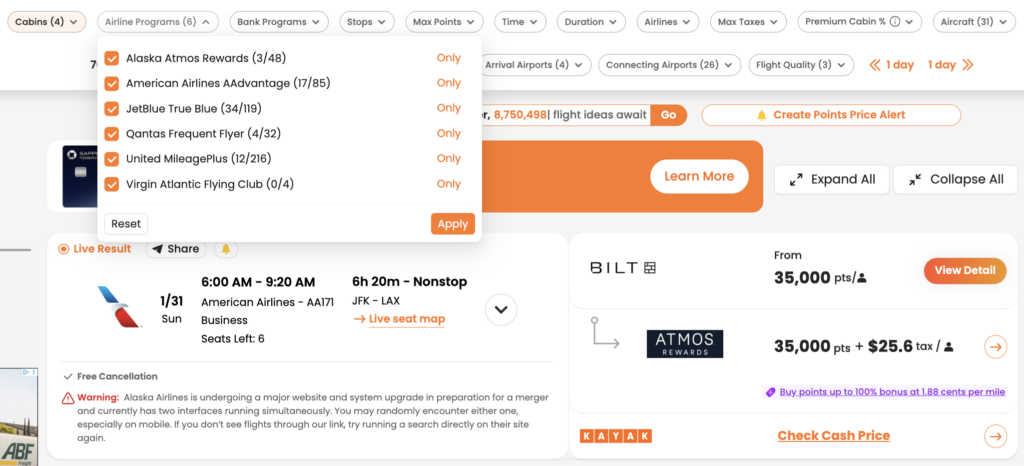
    For award flights, you can filter by:

    • Cabin
    • Airline program
    • Bank transfer partner
    • Number of stops
    • Maximum points
    • Maximum taxes and fees
    • Flight duration
    • Number of seats
    • Weekend travel

    For hotels, available filters include:

    • Hotel loyalty program
    • Hotel brand
    • Maximum points
    • Maximum cash price
    • Distance
    • Amenities
    • Free Night Certificates
    • Suites only

    As you adjust your filters, results update automatically so you can compare destinations without starting your search over.

    Browse by Travel Theme

    Not every trip starts with a destination.

    Daydream Explorer includes Explorer Themes, allowing you to browse destinations based on the type of trip you’d like to take.

    Available themes include options such as:

    • Beach
    • Family
    • City
    • Golf
    • Historical
    • Honeymoon
    • Ski
    • Boutique
    • Eco-Luxury
    • Unique Hotels

    Themes can be combined with your other filters, making it easier to discover destinations that match your travel style.

    Create Explorer Alerts

    Not ready to book yet?

    Create an Explorer Alert directly from your Daydream Explorer search to continue monitoring opportunities in the background.

    Explorer Alerts are available for both flights and hotels. Once an alert is created, PointsYeah will notify you when new opportunities matching your search criteria become available, so you don’t have to repeat the same search every day.

    Daydream Explorer vs. Live Search

    Daydream Explorer and Live Search work together, but they’re designed for different stages of trip planning.

    Use Daydream Explorer when you:

    • Haven’t decided where to travel.
    • Want inspiration for your next trip.
    • Want to compare destinations across a region or the world.
    • Prefer exploring possibilities before choosing a specific route.

    Use Live Search when you:

    • Already know where you’re going.
    • Want to search a specific route.
    • Need to confirm real-time award availability before booking.

    Many travelers start with Daydream Explorer to discover destinations, then switch to Live Search when they’re ready to compare real-time award options.

    Free vs. Premium

    Daydream Explorer is available to all PointsYeah members.

    Upgrading to PointsYeah Premium expands the rest of the platform with additional planning tools, including:

    • Longer Live Search windows
    • More active alerts
    • Family and Friends Points Wallet
    • Automatic syncing with select bank and airline programs
    • Additional Premium search features

    Related Guides

    Continue exploring PointsYeah:

  • How to Search for Award Hotels with PointsYeah

    How to Search for Award Hotels with PointsYeah

    Finding the right hotel isn’t just about location. You also want to compare points rates, cash prices, loyalty programs, and booking options before making a reservation.

    PointsYeah brings that information together in one place, making it easy to search award hotels across supported loyalty programs and compare your options in seconds.

    Whether you’re planning a specific trip or simply comparing hotels in a destination, here’s how to get started.

    Before You Search

    For the best experience, sign in to your PointsYeah account before searching.

    A free account unlocks personalized search preferences, hotel alerts, and other features that make planning future trips easier.

    If you’re new to the platform, start with Getting Started with PointsYeah before running your first hotel search.

    Start a Hotel Search

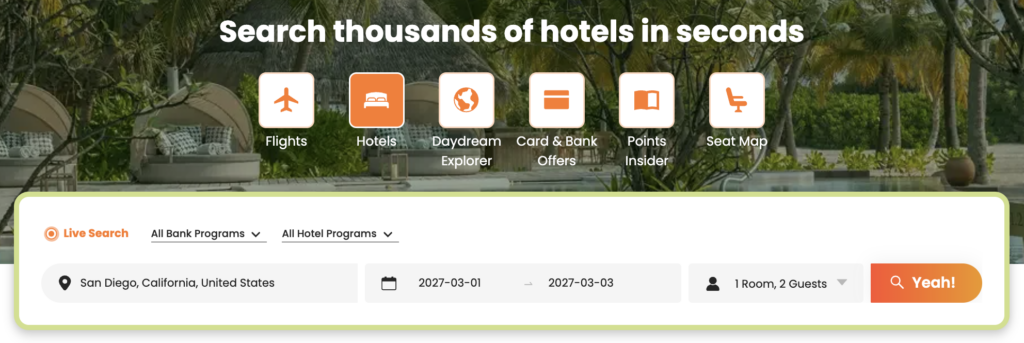
    From the Hotel Search page, enter your:

    • Destination
    • Check-in and check-out dates
    • Number of rooms and guests
    • Preferred bank or hotel loyalty programs (optional)

    Then select Yeah! to begin searching.

    Review Your Search Results

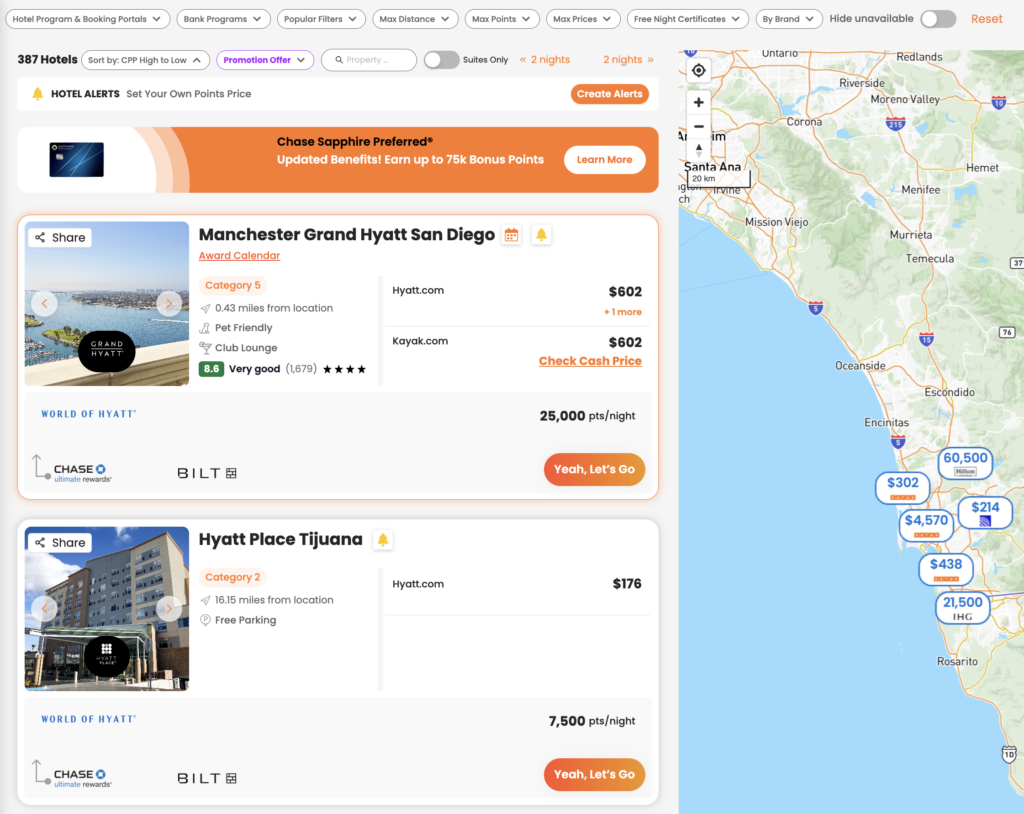
    PointsYeah searches supported hotel loyalty programs and displays available properties in a single list.

    Each result includes information to help you compare hotels, including:

    • Hotel name
    • Hotel loyalty program
    • Points required per night
    • Cash price
    • Hotel category (when available)
    • Distance from your search location
    • Amenities
    • Guest ratings
    • Eligible transfer partners

    If you’d rather browse visually, switch to the interactive map to compare hotels by location.

    Refine Your Search

    The filter bar lets you narrow your results without starting over.

    Available filters include:

    • Hotel loyalty programs
    • Bank programs
    • Maximum points
    • Maximum cash price
    • Maximum distance
    • Hotel brand
    • Free Night Certificates
    • Suites only
    • Popular filters
    • Hide unavailable hotels

    As you adjust filters, your results update automatically so you can quickly focus on the hotels that fit your trip.

    Search Tip

    If your plans are flexible, try adjusting your travel dates or searching a slightly larger area. Hotel award pricing can vary significantly from one night to the next, even at the same property.

    You can also personalize your preferred loyalty programs and other search settings in How to Personalize Your Searches.

    Compare Hotel Details

    Selecting a hotel opens a detailed view with everything you need before booking.

    Depending on the property, you’ll see:

    • Award price
    • Cash price
    • Hotel loyalty program
    • Eligible transfer partners
    • Hotel category (when available)
    • Amenities
    • Ratings and reviews

    Selecting Yeah, Let’s Go takes you directly to the hotel’s booking page for your selected dates so you can complete your reservation.

    Check the Award Calendar

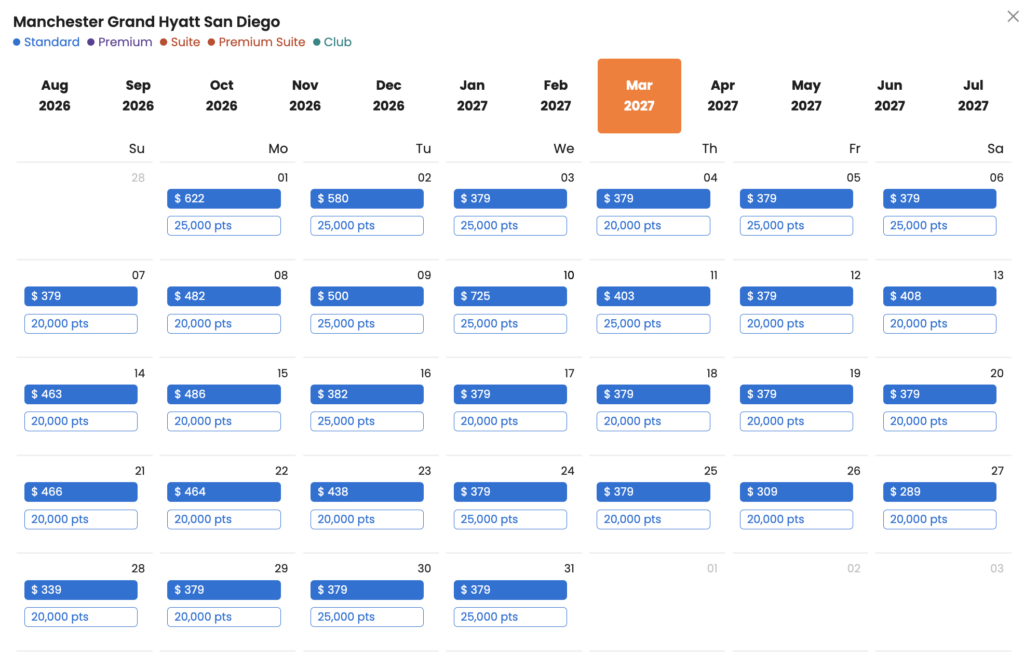
    Some hotels also show an Award Calendar.

    The Award Calendar lets you compare award pricing across multiple dates without running another search.

    For participating properties, you’ll see nightly points rates alongside cash prices, making it easier to identify lower-priced redemption dates if your schedule is flexible.

    Not every hotel offers an Award Calendar, but when available, it’s one of the fastest ways to compare award availability over time.

    Free vs. Premium

    Every PointsYeah account includes Hotel Search, with Premium adding additional tools for travelers who monitor hotel availability regularly.

    Free

    Free members can:

    • Search award hotels across supported loyalty programs.
    • Compare points and cash pricing.
    • Create up to 4 active Hotel Alerts.

    Premium

    PointsYeah Premium includes:

    • Up to 32 active Hotel Alerts.
    • Additional Premium search features across the platform.
    • Expanded tools for travelers planning multiple trips.

    If you frequently book hotels with points or monitor award availability before booking, Premium offers additional flexibility.

    Related Guides

    Once you’ve found a hotel, PointsYeah includes additional tools to help you plan the rest of your trip.

    You may also find these guides helpful:

  • Which Airlines and Hotels Can You Search with PointsYeah?

    Which Airlines and Hotels Can You Search with PointsYeah?

    PointsYeah lets you search award availability across a growing list of airline and hotel loyalty programs, making it easier to compare redemption options without searching each program individually.

    Whether you’re planning a flight, looking for an award hotel, or exploring destinations with Daydream Explorer, PointsYeah searches across supported loyalty programs to help you find the right option for your trip.

    Below you’ll find the airline and hotel loyalty programs currently supported.

    Supported Airline Loyalty Programs

    PointsYeah currently supports award searches across the following airline loyalty programs:

    Loyalty Program
    Aerolíneas Argentinas
    Aeromexico Rewards
    Air Canada Aeroplan
    Air France-KLM Flying Blue
    Alaska Airlines Atmos Rewards
    American Airlines AAdvantage
    Avianca LifeMiles
    Delta SkyMiles
    Etihad Guest
    Finnair Plus (Avios)
    JetBlue TrueBlue
    Lufthansa Miles & More
    Qantas Frequent Flyer
    SAS EuroBonus
    Turkish Miles&Smiles
    United MileagePlus
    Virgin Atlantic Flying Club
    Virgin Australia Velocity

    Supported Hotel Loyalty Programs

    PointsYeah also searches award availability across the following hotel loyalty programs:

    Loyalty Program
    Choice Privileges
    Hilton Honors
    World of Hyatt
    IHG One Rewards
    Marriott Bonvoy
    Wyndham Rewards

    Hotel searches are available through Live Search and Daydream Explorer Hotels, making it easy to compare award stays across multiple brands.

    Search Across Multiple Programs at Once

    Rather than checking each loyalty program individually, PointsYeah searches supported airline and hotel programs together so you can compare available redemption options in a single search.

    Depending on the tool you’re using, you can also filter results by loyalty program, airline, hotel brand, cabin, stops, and other preferences to narrow your search.

    Things to Know

    The list of supported airline and hotel loyalty programs continues to grow as new partners are added.

    Award availability is provided by each loyalty program and can change at any time.

    If a loyalty program isn’t currently supported, you won’t see award availability for that program in PointsYeah.

    Related Guides

    Learn more about searching with PointsYeah:

  • How to Search Amex Fine Hotels + Resorts with PointsYeah

    How to Search Amex Fine Hotels + Resorts with PointsYeah

    PointsYeah makes it easier to browse hotels participating in Fine Hotels + Resorts® (FHR) and The Hotel Collection before you book through Amex Travel.

    Rather than searching one destination at a time, you can explore participating properties on an interactive map or in a list view, then narrow the results using filters that match your travel plans.

    This guide explains how to find eligible hotels and make the most of the search tools available in PointsYeah.

    Who Can Use Fine Hotels + Resorts®?

    Fine Hotels + Resorts® is available to eligible Card Members, including those with The Platinum Card® from American Express and The Business Platinum Card® from American Express, when booking eligible prepaid stays through Amex Travel.

    The Hotel Collection is available to eligible American Express Card Members and includes a separate collection of participating hotels with its own set of benefits.

    Search Fine Hotels + Resorts® Hotels Through PointsYeah

    To search participating hotels:

    1. Open Daydream Explorer Hotels.
    2. Enter a destination, or browse using the interactive map.
    3. Turn on the Fine Hotels + Resorts® filter.
    4. Review participating hotels in either Map View or List View.

    From there, you can continue refining your search using the available hotel filters.

    Refine Your Results

    PointsYeah includes several filters that can help narrow eligible properties.

    You can filter by:

    • Destination
    • Travel dates
    • Nightly price
    • Hotel program
    • Amenities
    • Map or list view

    These filters make it easier to compare participating properties before visiting Amex Travel to complete your booking.

    Compare Hotels Before You Book

    Once you’ve narrowed your results, you can compare participating hotels side by side.

    Depending on the property, you’ll see information such as:

    • Nightly rate
    • Hotel brand
    • Location
    • Loyalty program
    • Amenities

    This makes it easier to identify properties that fit your travel plans before completing your reservation through Amex Travel.

    A Few Things to Know

    PointsYeah helps you discover participating hotels, but reservations must still be completed through Amex Travel to receive eligible Fine Hotels + Resorts® or The Hotel Collection benefits.

    Hotel prices and availability may change, and eligibility for FHR or The Hotel Collection is determined by American Express.

    Related Guides

    Continue exploring hotel tools on PointsYeah:

  • How to Personalize Your Flight and Hotel Searches

    How to Personalize Your Flight and Hotel Searches

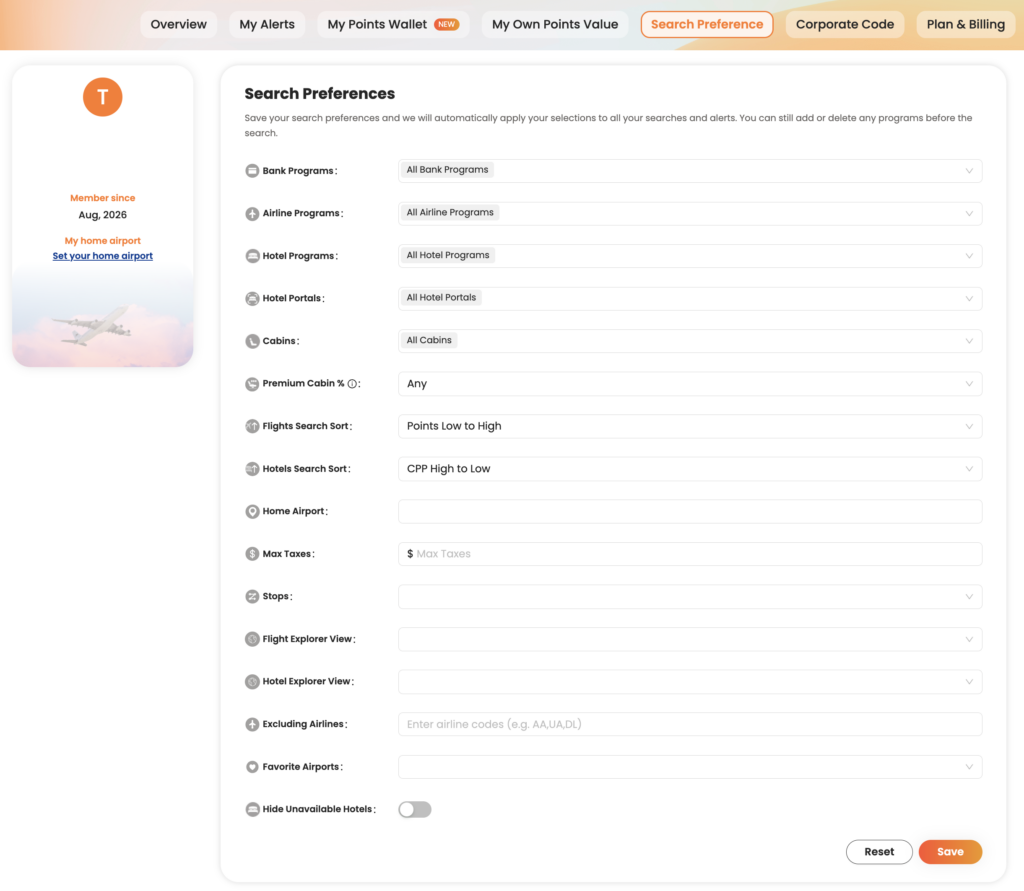
    PointsYeah lets you customize your search experience so the results better match the way you travel.

    By setting your preferred airports, loyalty programs, airlines, and other preferences, you can spend less time filtering results and more time finding award flights and hotels you’d actually book.

    Most preferences only need to be configured once, and they’ll automatically apply to future searches.

    Set Your Home Airports

    If you usually depart from the same airport or a handful of nearby airports, adding them to your preferences can make searching faster.

    Your home airports become the default starting point for many searches, helping you avoid repeatedly entering the same departure cities.

    Whether you fly from a major hub or a regional airport, setting your preferred origins helps tailor PointsYeah to your travel habits.

    Choose Your Preferred Rewards Programs

    PointsYeah supports a wide range of transferable bank rewards and airline and hotel loyalty programs.

    If you primarily earn rewards with programs like Chase Ultimate Rewards, American Express Membership Rewards, Capital One Miles, or Citi ThankYou Rewards, you can prioritize those programs in your search preferences.

    Doing so helps surface redemption options that are most relevant to the points you already have.

    Exclude Airlines You Don’t Want to Fly

    Everyone travels differently.

    If there are airlines you prefer not to fly, you can exclude them from your search results.

    Whether you’re avoiding high carrier surcharges, sticking with a particular alliance, or simply have personal preferences, excluding airlines helps reduce clutter and keeps your results focused.

    Assign Your Own Point Values (Premium)

    PointsYeah Premium members can assign custom values to their rewards programs.

    Rather than relying on a single valuation, you decide what each type of point or mile is worth to you. PointsYeah then uses those values when evaluating search results, making it easier to compare redemption options across different loyalty programs.

    This feature is especially useful if you consistently value certain rewards programs more highly than others.

    Customize Additional Search Preferences

    You’ll also find additional options that help tailor your searches, including:

    • Preferred cabin classes
    • Maximum taxes and fees
    • Airline and hotel loyalty programs
    • Hotel corporate codes
    • Default sorting preferences

    These settings help ensure your search results reflect how you actually travel.

    Why Personalization Matters

    The more PointsYeah understands your travel preferences, the more relevant your search results become.

    Instead of repeatedly adjusting filters or scrolling through options you’d never book, you can focus on comparing trips that match your goals from the start.

    Most settings only need to be configured once, and you can update them at any time.

    Related Guides

    Want to learn more about other PointsYeah features?

  • Getting Started with PointsYeah

    Getting Started with PointsYeah

    Welcome to PointsYeah. Whether you’re booking your first award trip or you’ve been collecting points for years, this guide will introduce the platform’s core tools, explain how they fit together, and help you get started.

    Sign In to Unlock Your Account

    The best experience starts with a free PointsYeah account.

    Signing in lets you save your preferences, create alerts, organize your rewards, and personalize the platform around the way you travel.

    If you decide you need even more flexibility, PointsYeah Premium unlocks additional features like expanded Live Search, Family and Friends Points Wallet, automatic account syncing, and more.

    Find the Right Tool for the Job

    PointsYeah is organized around a few core tools. Here’s what each one does and where to learn more.

    Live Search

    Live Search helps you find bookable award flights in real time across dozens of airline loyalty programs.

    Whether you’re searching for a specific route or comparing multiple airports, Live Search is the fastest way to see what’s available.

    Learn more:

    Daydream Explorer

    Not sure where you want to go?

    Daydream Explorer helps you discover destinations using an interactive map for both flights and hotels. Browse by continent, country, region, or airport, then narrow your search when something catches your eye.

    Learn more:

    Hotels

    Search award hotel availability across major loyalty programs, compare redemption options, and explore the Hotel Collection to discover places you can book with points.

    Learn more:

    Alerts

    You don’t have to keep checking for award availability.

    PointsYeah can monitor flights, hotels, and destinations for you and notify you when matching opportunities appear.

    Available alerts include:

    • Flight Price Alerts
    • Hotel Alerts
    • Explorer Alerts
    • Seat Alerts

    Learn more:

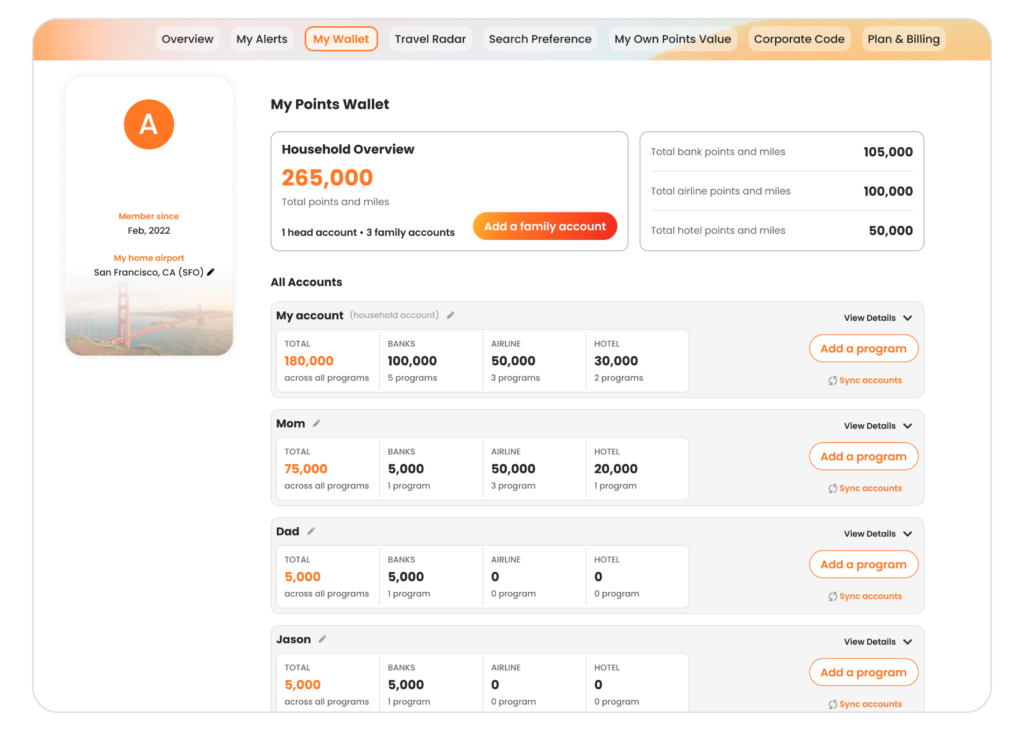
    My Wallet

    My Wallet helps you keep your airline, hotel, and bank rewards organized in one place.

    Premium members can also unlock automatic account syncing and the Family and Friends Points Wallet to manage rewards across multiple travelers.

    Learn more:

    Search Preferences

    Customize your favorite airports, default search settings, and other preferences so PointsYeah works the way you travel.

    Learn more:

    Free vs. Premium

    Every PointsYeah account includes powerful tools for searching award flights and hotels, creating alerts, and organizing your rewards.

    If you travel frequently or want additional flexibility, PointsYeah Premium expands the experience with features like:

    • Expanded Live Search
    • Family and Friends Points Wallet
    • Automatic account syncing
    • More alerts
    • Additional search capabilities

    You can compare plans and learn more on our PointsYeah Premium page.

    Where Should You Start?

    If you’re new to PointsYeah, here’s a simple path.

    • Know where you want to go? Start with Live Search.
    • Need travel inspiration? Open Daydream Explorer.
    • Waiting for award space? Create an Alert.
    • Want to organize your rewards? Set up My Wallet.
    • Travel often? Explore PointsYeah Premium to unlock additional planning tools.

    Welcome to the Community

    Thanks for joining PointsYeah.

    We’re building tools that make award travel easier to search, compare, and book, whether you’re planning next month’s vacation or dreaming about a trip years from now.

    As you explore the platform, you’ll find detailed guides throughout our Product section to help you get the most out of every feature.

    If you have questions, feedback, or feature requests, we’d love to hear from you at yeah@pointsyeah.com.